AI–LangChain进阶(一) 1.PromptTemplate PromptTemplate:通用提示词模版,支持动态注入信息
提示词优化在模型应用中非常重要,LangChain提供了PromptTemplate类,用来协助优化提示词,PromptTemplate表示提示词模版,可以构建一个自定义的基础提示词模版,支持变量的注入,最终生成所需要的提示词,这里有两种写法,一种是标准写法,一种是基于chain链的写法
1 2 3 4 5 6 7 8 9 10 11 12 13 14 15 import osfrom langchain_core.prompts import PromptTemplatefrom langchain_community.llms.tongyi import Tongyi"DASHSCOPE_API_KEY" ] = "key" "我的邻居姓{lastname}, 刚生了{gender}, 帮忙起名字, 请简略回答。" format (lastname="张" , gender="女儿" )"qwen-max" ) input =prompt_text) print (res)
1 2 3 4 5 6 7 8 9 10 11 12 13 14 15 16 17 import osfrom langchain_core.prompts import PromptTemplatefrom langchain_community.llms.tongyi import Tongyi"DASHSCOPE_API_KEY" ] = "key" "我的邻居姓{lastname}, 刚生了{gender}, 帮忙起名字, 请简略回答。" "qwen-max" ) input ={"lastname" : "曹" , "gender" : "女儿" })print (res)
2.FewShotPromptTemplate FewShotPromptTemplate:支持基于模版注入容易数量的示例信息
在提示词工程中我们有提到两种思想的提示词,既然有Zero-Shot则必然有对应的Few-Shot,在LangChain中使用的对应模块则是FewShotPromptTemlate
1 2 3 4 5 6 7 FewShotPromptTemplate(None , None , None , None , None ,
这里举个例子:
1
2
3
4
5
6
7
8
9
10
11
12
13
14
15
16
17
18
19
20
21
22
23
24
25
26
27
28
29
30
31
32
33
import osfrom langchain_community.chat_models.tongyi import ChatTongyifrom langchain_core.prompts import FewShotPromptTemplate, PromptTemplate"DASHSCOPE_API_KEY" ] = "key" "qwen-max" )"单词:{word}\n反义词:{antonym}" "word" : "热" , "antonym" : "冷" },"word" : "大" , "antonym" : "小" },"word" : "快" , "antonym" : "慢" },"请给出每个单词的反义词:,有如下示例:\n" , "基于示例得知,{input_word}的反义词是:" , "input_word" ], format (input_word="左" )for chunk in chat.stream(input =prompt_text): print (chunk.content, end="" , flush=True )print ("\n-----------------" )
这两个玩意其实是提示词内容的填充方式,在我们所提到的三种提示词方法中都支持这两种,因为历史原因,三种提示词方法都能兼容这两种填充方式
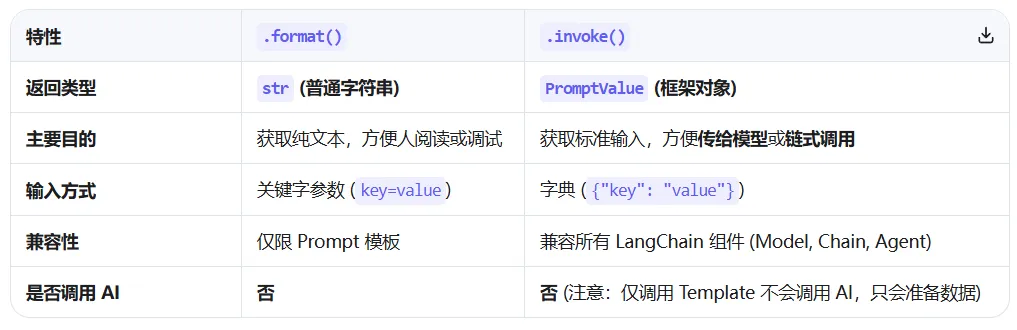
主要对比区别在于:
如果我们对返回值可以接受是字符串的话使用format就没有问题,但是当后续我们需要用到chain链的时候,就需要使用invoke进行操作了,所以在正式的 LangChain 开发中,推荐优先使用invoke,因为它是框架统一的标准接口,兼容性更好
1
2
3
4
5
6
7
8
9
10
11
12
13
14
15
16
17
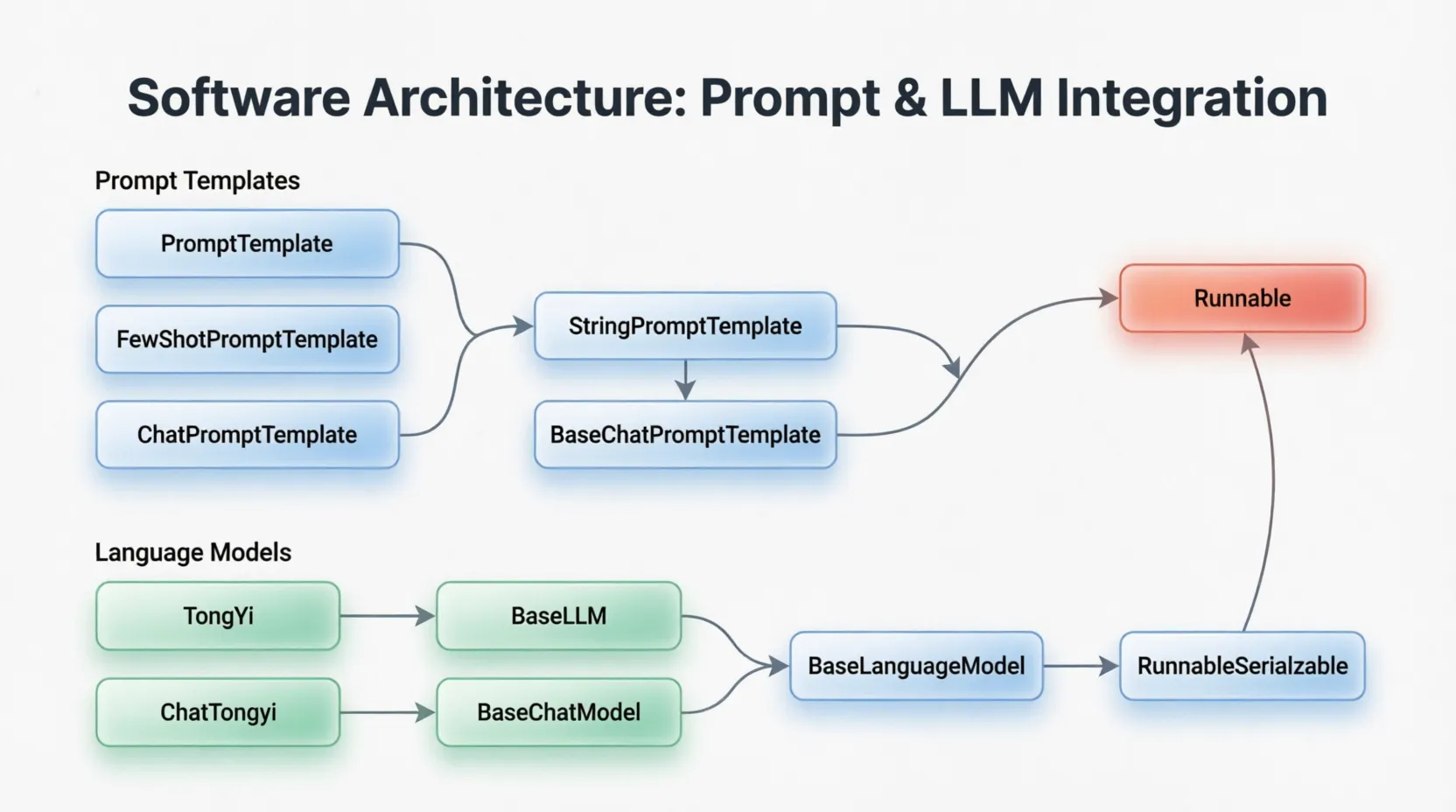
from langchain_core.prompts import PromptTemplatefrom langchain_core.prompts import FewShotPromptTemplatefrom langchain_core.prompts import ChatPromptTemplate""" PromptTemplate -> StringPromptTemplate -> BasePromptTemplate -> RunnableSerializable -> Runnable FewShotPromptTemplate -> StringPromptTemplate -> BasePromptTemplate -> RunnableSerializable -> Runnable ChatPromptTemplate -> BaseChatPromptTemplate -> BasePromptTemplate -> RunnableSerializable -> Runnable """ "我的邻居是,{neighbor},最喜欢,{favorite}" )format (neighbor="撩月" , favorite="摄影" )print (res1, type (res1))input ={"neighbor" : "撩月" , "favorite" : "摄影" })print (res2, type (res2))
4.ChatPromptTemplate ChatPromptTemplate:支持注入任意数量的历史会话信息
在前面学到的两种提示词模版中,只能接入少量的信息,而 ChatPromptTemplate通过from_messages方法,从列表中获取多轮次会话作为聊天的基础模版
1
2
3
4
5
6
7
8
from langchain_core.prompts import ChatPromptTemplate"system" , "你是一个专业的翻译" ),"human" , "你好" ),"ai" , "Hello" ),"human" , "{input}" ),
但是如果没有信息能够动态注入的话明显是不够的,所以这里引入MessagesPlaceholder,他作为占位符,提供history作为占位的key,最后基于invoke动态注入历史会话记录中,需要注意的是,这里必须是invoke,format是无法注入的
1
2
3
4
5
6
7
8
9
10
11
12
13
14
15
16
17
18
19
20
21
22
23
24
25
26
27
28
29
30
from langchain_core.prompts import ChatPromptTemplatefrom langchain_core.prompts import MessagesPlaceholderfrom langchain_community.chat_models.tongyi import ChatTongyiimport os"DASHSCOPE_API_KEY" ] = "key" "system" , "你是一个边塞诗人,可以作诗" ),"history" ),"human" , "请再来一首唐诗" ),"human" , "你来写一个唐诗" ),"ai" , "床前明月光,疑是地上霜,举头望明月,低头思故乡。" ),"human" , "好诗,再来一首" ),"ai" , "锄禾日当午,汗滴禾下土,谁知盘中餐,粒粒皆辛苦。" ),"history" : history_data}).to_string()print (prompt)"qwen-max" )print (res.content)
5.Chain的基础使用 将组件串联,上一个组件的输出作为下一个组件的输入,是LangChain链的核心工作原理,这也是链式调用的核心价值,实现数据的自动化流转与组件的协同工作,例如:
1 chain = promot_template | model
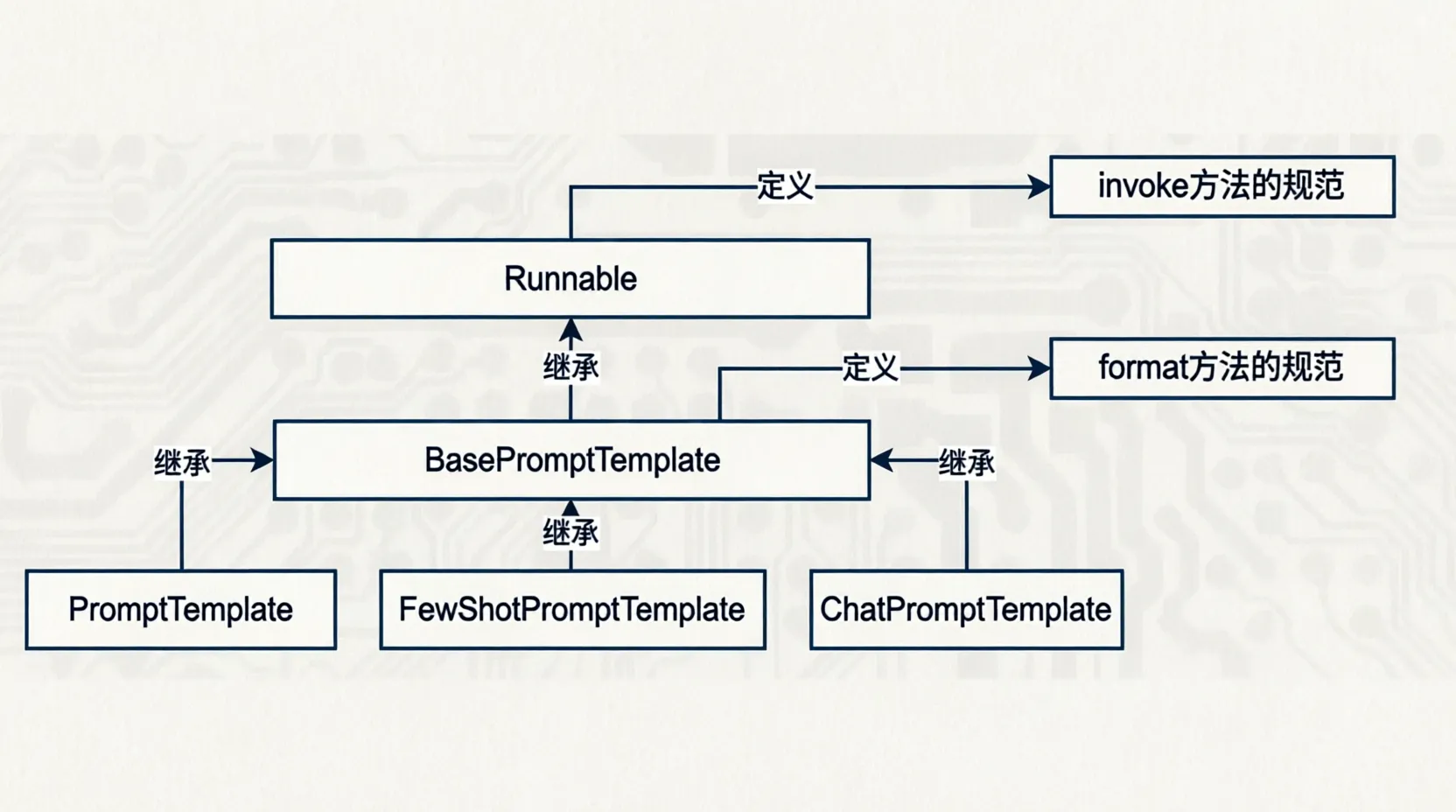
这里需要注意有一个核心前提,即需要是Runnable子类对象才能入链(Callable Mapping接口子类对象也可以接入,不过目前用的不多),前面所列举的组件均是Runnable接口的子类,如下类的继承关系:
1
2
3
4
5
6
7
8
9
10
11
12
13
14
15
16
17
18
19
20
21
22
23
24
25
26
27
28
29
30
31
32
import osfrom langchain_core.prompts import ChatPromptTemplatefrom langchain_core.prompts import MessagesPlaceholderfrom langchain_community.chat_models.tongyi import ChatTongyifrom langchain_core.runnables.base import RunnableSerializable"DASHSCOPE_API_KEY" ] = "key" "system" , "你是一个边塞诗人,可以作诗" ),"history" ),"human" , "请再来一首唐诗" ),"human" , "你来写一个唐诗" ),"ai" , "床前明月光,疑是地上霜,举头望明月,低头思故乡。" ),"human" , "好诗,再来一首" ),"ai" , "锄禾日当午,汗滴禾下土,谁知盘中餐,粒粒皆辛苦。" ),"qwen-max" )print (type (chain))input ={"history" : history_data})print (res.content)for chunk in chain.stream(input ={"history" : history_data}):print (chunk.content, end="" , flush=True )
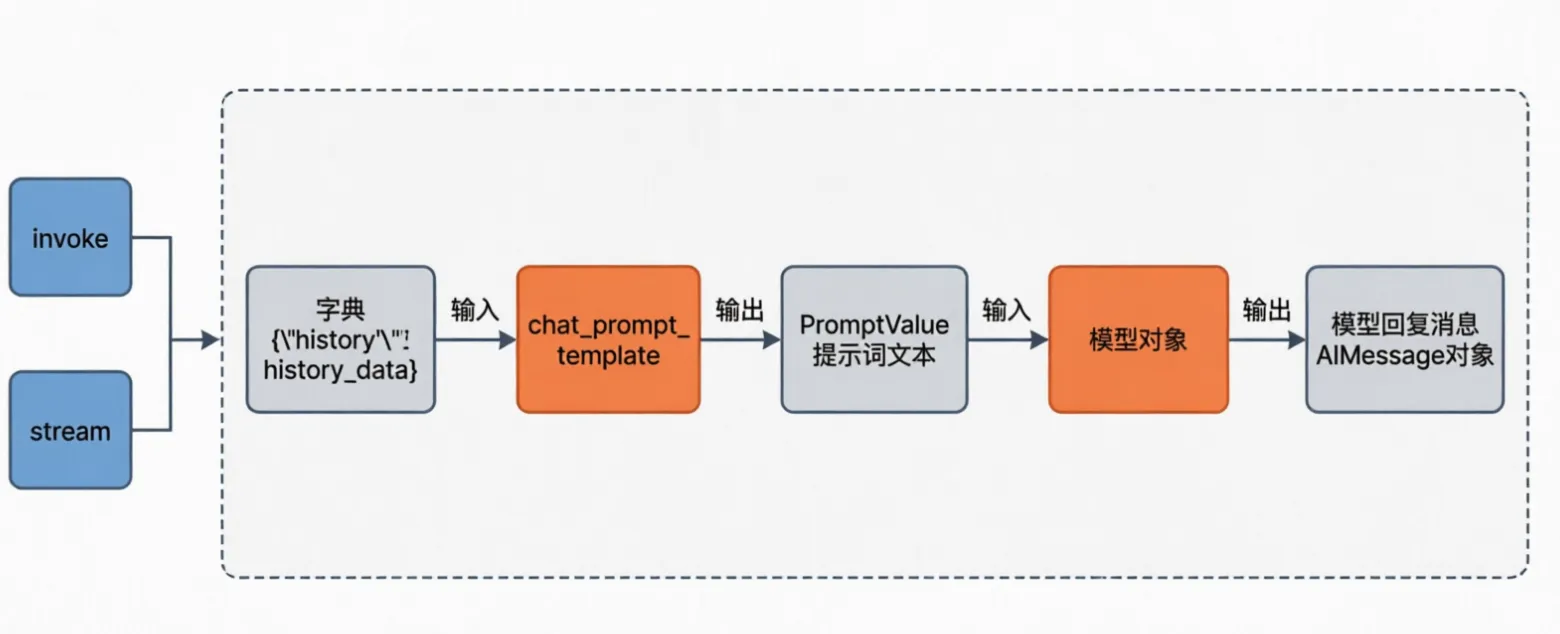
在构造链后,我们就可以通过链调用invoke或者stream触发整个链条的执行,前面代码执行的流程如下: