AI--RAG在线流程开发

AI–RAG在线流程开发

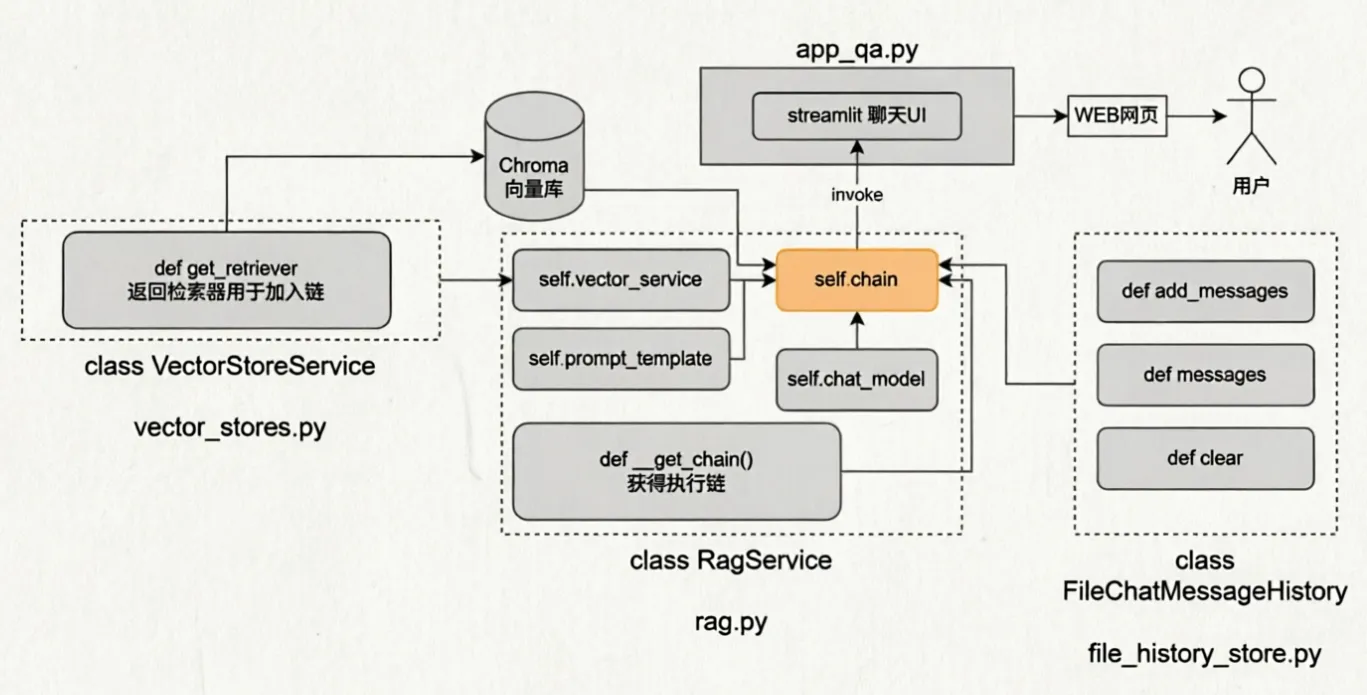
0.在线服务流程流程图

  在线流程的开发主要涉及四个脚本

  • 向量检索功能 wector_stores.py
  • rag服务核心功能 rag.py
  • 历史会话记录功能 file_history_store.py
  • l聊天UI界面 app_qa.py


1.向量检索

1
2
3
4
5
6
7
8
9
10
11
12
13
14
15
16
17
18
19
20
21
22
23
24
25
26
27
28
29
30
31
32
33
34
35
36
37
38
from langchain_chroma import Chroma
import config_data as config


class VectorStoresService(object):
def __init__(self, embedding):
"""
:param embedding: 嵌入函数
"""

self.embedding = embedding

self.vector_stores = Chroma(
collection_name=config.chroma_collection_name, # 向量库的名称 表名
embedding_function=self.embedding, # 嵌入函数
persist_directory=config.chroma_persist_directory, # 向量库的持久化目录
)

def get_retriever(self):
"""
返回向量检索器,方便加入chain链
"""
return self.vector_stores.as_retriever(search_kwargs={"k": config.similarity_threshold})


if __name__ == "__main__":
# 测试代码
from langchain_community.embeddings import DashScopeEmbeddings
embedding = DashScopeEmbeddings(model="text-embedding-v4")

vector_stores_service = VectorStoresService(embedding)
retriever = VectorStoresService(embedding).get_retriever()


results = retriever.invoke("我体重160斤,推荐什么尺码")
print(results)


2.RAG服务

1
2
3
4
5
6
7
8
9
10
11
12
13
14
15
16
17
18
19
20
21
22
23
24
25
26
27
28
29
30
31
32
33
34
35
36
37
38
39
40
41
42
43
44
45
46
47
48
49
50
51
52
53
54
55
56
57
58
59
from langchain_core.documents import Document
from vector_stores import VectorStoresService
from langchain_community.embeddings import DashScopeEmbeddings
import config_data as config
from langchain_core.prompts import ChatPromptTemplate
from langchain_core.output_parsers import StrOutputParser
from langchain_community.chat_models import ChatTongyi
from langchain_core.runnables import RunnablePassthrough


def print_prompt(full_prompt):
print("="*20)
print(full_prompt)
print("="*20)
return full_prompt

class RAGService(object):
def __init__(self):

self.vector_service = VectorStoresService(
embedding=DashScopeEmbeddings(model=config.embedding_model_name)
)

self.prompt_template = ChatPromptTemplate.from_messages([
("system", "基于所提供的参考资料,回答用户问题。参考资料:{context}"),
("human", "请回答问题:{input}"),
])

self.chat_model = ChatTongyi(model=config.chat_model_name)

self.chain = self._get_chain()

def _get_chain(self):
""" 获取最终的执行链"""

retriever = self.vector_service.get_retriever()

def format_documents(docs: list[Document]):
if not docs:
return "没有相关参考资料。"

formatted_str = ""
for doc in docs:
formatted_str += f"文档判断:{doc.page_content}\n文档元数据:{doc.metadata}\n\n"
return formatted_str

chain = (
{
"input": RunnablePassthrough(),
"context": retriever | format_documents
} | self.prompt_template | print_prompt | self.chat_model | StrOutputParser()

)

return chain

if __name__ == "__main__":
rag_service = RAGService()
print(rag_service.chain.invoke("我体重180斤,尺码推荐"))


3.历史会话记录功能

1
2
3
4
5
6
7
8
9
10
11
12
13
14
15
16
17
18
19
20
21
22
23
24
25
26
27
28
29
30
31
32
33
34
35
36
37
38
39
40
41
42
43
44
45
46
47
48
49
50
51
52
from langchain_core.chat_history import BaseChatMessageHistory
from langchain_core.messages import BaseMessage, message_to_dict, messages_from_dict
import json
import os
from typing import Sequence


def get_history(session_id):
return FileChatMessageHistory(session_id, "./Z_AI_RAG/chat_history")

class FileChatMessageHistory(BaseChatMessageHistory):
# 初始化会话id和存储路径
def __init__(self, session_id, storage_path):
self.session_id = session_id
self.storage_path = storage_path
self.file_path = os.path.join(self.storage_path, f"{self.session_id}.json")

#确保存储路径存在
os.makedirs(os.path.dirname(self.file_path), exist_ok=True)

# 添加消息到会话历史
def add_messages(self, message: Sequence[BaseMessage]) -> None:
# Sequence序列 类型list tuple
all_messages = list(self.messages) #已有的消息列表
all_messages.extend(message) # 合并新消息

# 将数据同步写入到本地文件中
# 类对象写入文件 -> 一堆二进制
# 为了方便,可以将BaseMessage消息转为字典(借助json模块以json字符串写入文件)
# 官方message_to_dict: 单个消息对象 (BaseMessage类实例) -> 字典
new_messages = [message_to_dict(message) for message in all_messages]
#new_messages = messages_to_dict(all_messages)

#将数据写入文件
with open(self.file_path, "w", encoding="utf-8") as f:
json.dump(new_messages, f)


# 获取会话历史消息
@property # @property装饰器将messages方法转换为成员属性
def messages(self) -> list[BaseMessage]:
# 当前文件内: list[字典]
try:
with open(self.file_path, "r", encoding="utf-8") as f:
message_data = json.load(f)
return messages_from_dict(message_data)
except FileNotFoundError:
return []
def clear(self) -> None:
# 清空文件内容
with open(self.file_path, "w", encoding="utf-8") as f:
json.dump([], f)


4.聊天UI界面

1
2
3
4
5
6
7
8
9
10
11
12
13
14
15
16
17
18
19
20
21
22
23
24
25
26
27
28
29
30
31
32
33
34
35
36
37
38
39
40
41
42
43
44
import time

from chromadb import config
from rag import RagService
import streamlit as st
from config_data import session_config

#标题
st.title("智能问答系统")
# 分隔线
st.divider()


if "messages" not in st.session_state:
st.session_state["messages"] = [{"role": "assistant", "content": "你好,大葱蘸酱很高兴为您服务"}]

if "rag" not in st.session_state:
st.session_state["rag"] = RagService()


for message in st.session_state["messages"]:
st.chat_message(message["role"]).write(message["content"])

#在页面最下方提供用户输入栏
prompt = st.chat_input()

if prompt:

#在页面输出用户的提问
st.chat_message("user").write(prompt)

st.session_state["messages"].append({"role": "user", "content": prompt})

#直输出模型的回复
# with st.spinner("思考中,请稍后..."):
# response = st.session_state["rag"].chain.invoke({"input": prompt}, session_config)
# st.chat_message("assistant").write(response)
# st.session_state["messages"].append({"role": "assistant", "content": response})

#流式输出模型的回复
with st.spinner("思考中,请稍后..."):
response_stream = st.session_state["rag"].chain.stream({"input": prompt}, session_config)
res = st.chat_message("assistant").write_stream(response_stream)
st.session_state["messages"].append({"role": "assistant", "content": res})


5.合并代码块

  • vector_stores.py
1
2
3
4
5
6
7
8
9
10
11
12
13
14
15
16
17
18
19
20
21
22
23
24
25
26
27
28
29
30
31
32
33
34
35
36
37
from langchain_chroma import Chroma
import config_data as config


class VectorStoresService(object):
def __init__(self, embedding):
"""
:param embedding: 嵌入函数
"""

self.embedding = embedding

self.vector_stores = Chroma(
collection_name=config.chroma_collection_name, # 向量库的名称 表名
embedding_function=self.embedding, # 嵌入函数
persist_directory=config.chroma_persist_directory, # 向量库的持久化目录
)

def get_retriever(self):
"""
返回向量检索器,方便加入chain链
"""
return self.vector_stores.as_retriever(search_kwargs={"k": config.similarity_threshold})


# if __name__ == "__main__":
# # 测试代码
# from langchain_community.embeddings import DashScopeEmbeddings
# embedding = DashScopeEmbeddings(model="text-embedding-v4")

# vector_stores_service = VectorStoresService(embedding)
# retriever = VectorStoresService(embedding).get_retriever()


# results = retriever.invoke("那我身高170呢")
# print(results)
  • rag.py
1
2
3
4
5
6
7
8
9
10
11
12
13
14
15
16
17
18
19
20
21
22
23
24
25
26
27
28
29
30
31
32
33
34
35
36
37
38
39
40
41
42
43
44
45
46
47
48
49
50
51
52
53
54
55
56
57
58
59
60
61
62
63
64
65
66
67
68
69
70
71
72
73
74
75
76
77
78
79
80
81
82
83
84
85
86
87
88
89
from langchain_core.documents import Document
from langchain_core.runnables.base import RunnableLambda
from vector_stores import VectorStoresService
from langchain_community.embeddings import DashScopeEmbeddings
import config_data as config
from langchain_core.prompts import ChatPromptTemplate, MessagesPlaceholder
from langchain_core.output_parsers import StrOutputParser
from langchain_community.chat_models import ChatTongyi
from langchain_core.runnables import RunnablePassthrough, RunnableWithMessageHistory
from langchain_core.chat_history import BaseChatMessageHistory
from file_history_store import get_history


def print_prompt(full_prompt):
print("="*20)
print(full_prompt)
print("="*20)
return full_prompt

class RagService(object):
def __init__(self):

self.vector_service = VectorStoresService(
embedding=DashScopeEmbeddings(model=config.embedding_model_name)
)

self.prompt_template = ChatPromptTemplate.from_messages([
("system", "基于所提供的参考资料,回答用户问题。参考资料:{context}"),
MessagesPlaceholder(variable_name="chat_history"),
("human", "请回答问题:{input}"),
])

self.chat_model = ChatTongyi(model=config.chat_model_name)

self.chain = self._get_chain()

def _get_chain(self):
""" 获取最终的执行链"""

retriever = self.vector_service.get_retriever()

def format_documents(docs: list[Document]):
if not docs:
return "没有相关参考资料。"

formatted_str = ""
for doc in docs:
formatted_str += f"文档判断:{doc.page_content}\n文档元数据:{doc.metadata}\n\n"
return formatted_str

def format_for_retriever(value: dict) -> str:
return value["input"]

def format_for_prompt_template(value: dict) :
new_value = {}
new_value["input"] = value["input"]["input"]
new_value["context"] = value["context"]
new_value["chat_history"] = value["input"]["chat_history"]
return new_value


chain = (
{
"input": RunnablePassthrough(),
"context": RunnableLambda(format_for_retriever) | retriever | format_documents
} | RunnableLambda(format_for_prompt_template) | self.prompt_template | print_prompt | self.chat_model | StrOutputParser()
)

conversation_chain = RunnableWithMessageHistory(
chain,
get_history,
input_messages_key="input",
history_messages_key="chat_history",
)

return conversation_chain

if __name__ == "__main__":
# session id 配置
session_config = {
"configurable": {
"session_id": "user_001"
}
}


rag_service = RagService()
print(rag_service.chain.invoke({"input": "那我身高170呢"}, session_config))
  • file_history_store.py
1
2
3
4
5
6
7
8
9
10
11
12
13
14
15
16
17
18
19
20
21
22
23
24
25
26
27
28
29
30
31
32
33
34
35
36
37
38
39
40
41
42
43
44
45
46
47
48
49
50
51
52
from langchain_core.chat_history import BaseChatMessageHistory
from langchain_core.messages import BaseMessage, message_to_dict, messages_from_dict
import json
import os
from typing import Sequence


def get_history(session_id):
return FileChatMessageHistory(session_id, "./Z_AI_RAG/chat_history")

class FileChatMessageHistory(BaseChatMessageHistory):
# 初始化会话id和存储路径
def __init__(self, session_id, storage_path):
self.session_id = session_id
self.storage_path = storage_path
self.file_path = os.path.join(self.storage_path, f"{self.session_id}.json")

#确保存储路径存在
os.makedirs(os.path.dirname(self.file_path), exist_ok=True)

# 添加消息到会话历史
def add_messages(self, message: Sequence[BaseMessage]) -> None:
# Sequence序列 类型list tuple
all_messages = list(self.messages) #已有的消息列表
all_messages.extend(message) # 合并新消息

# 将数据同步写入到本地文件中
# 类对象写入文件 -> 一堆二进制
# 为了方便,可以将BaseMessage消息转为字典(借助json模块以json字符串写入文件)
# 官方message_to_dict: 单个消息对象 (BaseMessage类实例) -> 字典
new_messages = [message_to_dict(message) for message in all_messages]
#new_messages = messages_to_dict(all_messages)

#将数据写入文件
with open(self.file_path, "w", encoding="utf-8") as f:
json.dump(new_messages, f)


# 获取会话历史消息
@property # @property装饰器将messages方法转换为成员属性
def messages(self) -> list[BaseMessage]:
# 当前文件内: list[字典]
try:
with open(self.file_path, "r", encoding="utf-8") as f:
message_data = json.load(f)
return messages_from_dict(message_data)
except FileNotFoundError:
return []
def clear(self) -> None:
# 清空文件内容
with open(self.file_path, "w", encoding="utf-8") as f:
json.dump([], f)
  • app_qa.py
1
2
3
4
5
6
7
8
9
10
11
12
13
14
15
16
17
18
19
20
21
22
23
24
25
26
27
28
29
30
31
32
33
34
35
36
37
38
39
40
41
42
43
44
import time

from chromadb import config
from rag import RagService
import streamlit as st
from config_data import session_config

#标题
st.title("智能问答系统")
# 分隔线
st.divider()


if "messages" not in st.session_state:
st.session_state["messages"] = [{"role": "assistant", "content": "你好,大葱蘸酱很高兴为您服务"}]

if "rag" not in st.session_state:
st.session_state["rag"] = RagService()


for message in st.session_state["messages"]:
st.chat_message(message["role"]).write(message["content"])

#在页面最下方提供用户输入栏
prompt = st.chat_input()

if prompt:

#在页面输出用户的提问
st.chat_message("user").write(prompt)

st.session_state["messages"].append({"role": "user", "content": prompt})

#直输出模型的回复
# with st.spinner("思考中,请稍后..."):
# response = st.session_state["rag"].chain.invoke({"input": prompt}, session_config)
# st.chat_message("assistant").write(response)
# st.session_state["messages"].append({"role": "assistant", "content": response})

#流式输出模型的回复
with st.spinner("思考中,请稍后..."):
response_stream = st.session_state["rag"].chain.stream({"input": prompt}, session_config)
res = st.chat_message("assistant").write_stream(response_stream)
st.session_state["messages"].append({"role": "assistant", "content": res})
  • config_data.py
1
2
3
4
5
6
7
8
9
10
11
12
13
14
15
16
17
18
19
20
21
22
23
24
25
26
md5_file_path = "./md5.txt"


#Chroma向量库的配置
chroma_collection_name = "RAG"
chroma_persist_directory = "./chroma_db"

#spliter
chunk_size = 1000 # 每个文本块的最大字符数
chunk_overlap = 100 # 连续文本块之间的重叠字符数
separators = ["\n\n", "\n", "。", "!", "?", "!", "?", " "] # 自然段落划分的符号
max_splist_chat_number = 1000 # 文本分割的阈值,超过才进行分割

# 相似度检索阈值
similarity_threshold = 1 # 检索返回匹配的文档数量

#mox 模型的配置
embedding_model_name = "text-embedding-v4"
chat_model_name = "qwen3-max"

#会话配置
session_config = {
"configurable": {
"session_id": "user_001"
}
}

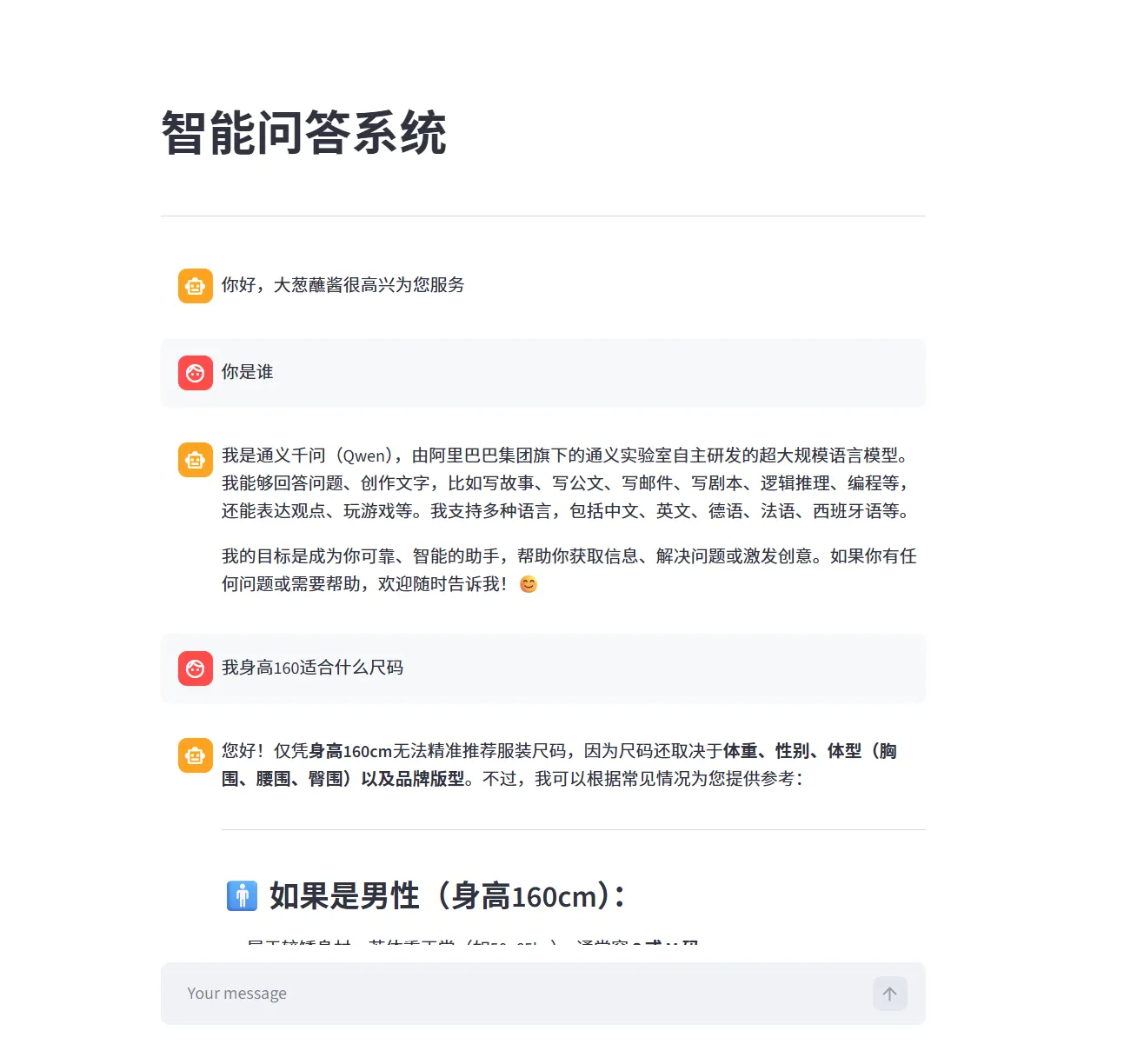
  最终效果:


AI--RAG在线流程开发
https://one-null-pointer.github.io/2026/02/07/AI--RAG在线流程开发/
Author
liaoyue
Posted on
February 7, 2026
传送口